Task Lifecycle
When Aurora reads a configuration file and finds a Job definition, it:
- Evaluates the
Jobdefinition. - Splits the
Jobinto its constituentTasks. - Sends those
Tasks to the scheduler. - The scheduler puts the
Tasks intoPENDINGstate, starting eachTask's life cycle.
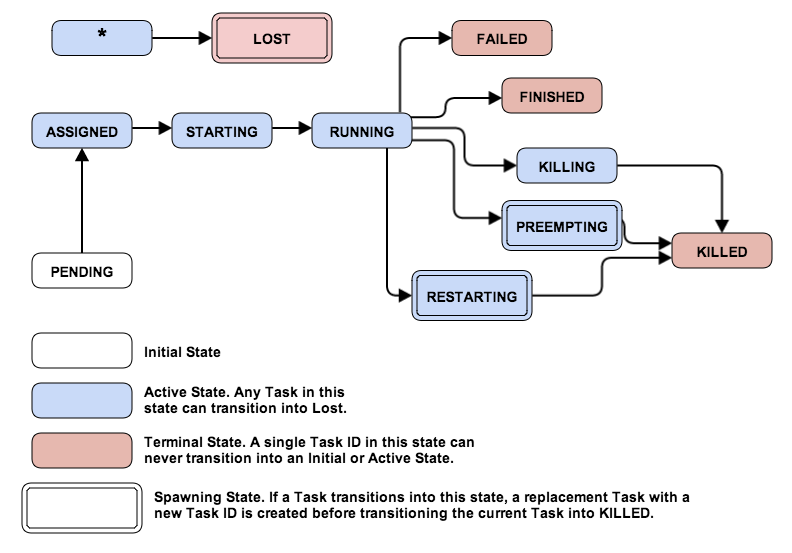
Please note, a couple of task states described below are missing from this state diagram.
PENDING to RUNNING states
When a Task is in the PENDING state, the scheduler constantly
searches for machines satisfying that Task's resource request
requirements (RAM, disk space, CPU time) while maintaining configuration
constraints such as "a Task must run on machines dedicated to a
particular role" or attribute limit constraints such as "at most 2
Tasks from the same Job may run on each rack". When the scheduler
finds a suitable match, it assigns the Task to a machine and puts the
Task into the ASSIGNED state.
From the ASSIGNED state, the scheduler sends an RPC to the agent
machine containing Task configuration, which the agent uses to spawn
an executor responsible for the Task's lifecycle. When the scheduler
receives an acknowledgment that the machine has accepted the Task,
the Task goes into STARTING state.
STARTING state initializes a Task sandbox. When the sandbox is fully
initialized, Thermos begins to invoke Processes. Also, the agent
machine sends an update to the scheduler that the Task is
in RUNNING state, only after the task satisfies the liveness requirements.
See Health Checking for more details
for how to configure health checks.
RUNNING to terminal states
There are various ways that an active Task can transition into a terminal
state. By definition, it can never leave this state. However, depending on
nature of the termination and the originating Job definition
(e.g. service, max_task_failures), a replacement Task might be
scheduled.
Natural Termination: FINISHED, FAILED
A RUNNING Task can terminate without direct user interaction. For
example, it may be a finite computation that finishes, even something as
simple as echo hello world., or it could be an exceptional condition in
a long-lived service. If the Task is successful (its underlying
processes have succeeded with exit status 0 or finished without
reaching failure limits) it moves into FINISHED state. If it finished
after reaching a set of failure limits, it goes into FAILED state.
A terminated TASK which is subject to rescheduling will be temporarily
THROTTLED, if it is considered to be flapping. A task is flapping, if its
previous invocation was terminated after less than 5 minutes (scheduler
default). The time penalty a task has to remain in the THROTTLED state,
before it is eligible for rescheduling, increases with each consecutive
failure.
Forceful Termination: KILLING, RESTARTING
You can terminate a Task by issuing an aurora job kill command, which
moves it into KILLING state. The scheduler then sends the agent a
request to terminate the Task. If the scheduler receives a successful
response, it moves the Task into KILLED state and never restarts it.
If a Task is forced into the RESTARTING state via the aurora job restart
command, the scheduler kills the underlying task but in parallel schedules
an identical replacement for it.
In any case, the responsible executor on the agent follows an escalation sequence when killing a running task:
- If a
HttpLifecycleConfigis not present, skip to (4). - Send a POST to the
graceful_shutdown_endpointand waitgraceful_shutdown_wait_secsseconds. - Send a POST to the
shutdown_endpointand waitshutdown_wait_secsseconds. - Send SIGTERM (
kill) and wait at mostfinalization_waitseconds. - Send SIGKILL (
kill -9).
If the executor notices that all Processes in a Task have aborted
during this sequence, it will not proceed with subsequent steps.
Note that graceful shutdown is best-effort, and due to the many
inevitable realities of distributed systems, it may not be performed.
Unexpected Termination: LOST
If a Task stays in a transient task state for too long (such as ASSIGNED
or STARTING), the scheduler forces it into LOST state, creating a new
Task in its place that's sent into PENDING state.
In addition, if the Mesos core tells the scheduler that a agent has
become unhealthy (or outright disappeared), the Tasks assigned to that
agent go into LOST state and new Tasks are created in their place.
From PENDING state, there is no guarantee a Task will be reassigned
to the same machine unless job constraints explicitly force it there.
RUNNING to PARTITIONED states
If Aurora is configured to enable partition awareness, a task which is in a
running state can transition to PARTITIONED. This happens when the state
of the task in Mesos becomes unknown. By default Aurora errs on the side of
availability, so all tasks that transition to PARTITIONED are immediately
transitioned to LOST.
This policy is not ideal for all types of workloads you may wish to run in
your Aurora cluster, e.g. for jobs where task failures are very expensive.
So job owners may set their own PartitionPolicy where they can control
how long to remain in PARTITIONED before transitioning to LOST. Or they
can disable any automatic attempts to reschedule when in PARTITIONED,
effectively waiting out the partition for as long as possible.
PARTITIONED and transient states
The PartitionPolicy provided by users only applies to tasks which are
currently running. When tasks are moving in and out of transient states,
e.g. tasks being updated, restarted, preempted, etc., PARTITIONED tasks
are moved immediately to LOST. This prevents situations where system
or user-initiated actions are blocked indefinitely waiting for partitions
to resolve (that may never be resolved).
Giving Priority to Production Tasks: PREEMPTING
Sometimes a Task needs to be interrupted, such as when a non-production
Task's resources are needed by a higher priority production Task. This
type of interruption is called a pre-emption. When this happens in
Aurora, the non-production Task is killed and moved into
the PREEMPTING state when both the following are true:
- The task being killed is a non-production task.
- The other task is a
PENDINGproduction task that hasn't been scheduled due to a lack of resources.
The scheduler UI shows the non-production task was preempted in favor of
the production task. At some point, tasks in PREEMPTING move to KILLED.
Note that non-production tasks consuming many resources are likely to be preempted in favor of production tasks.
Making Room for Maintenance: DRAINING
Cluster operators can set agent into maintenance mode. This will transition
all Task running on this agent into DRAINING and eventually to KILLED.
Drained Tasks will be restarted on other agents for which no maintenance
has been announced yet.
State Reconciliation
Due to the many inevitable realities of distributed systems, there might
be a mismatch of perceived and actual cluster state (e.g. a machine returns
from a netsplit but the scheduler has already marked all its Tasks as
LOST and rescheduled them).
Aurora regularly runs a state reconciliation process in order to detect
and correct such issues (e.g. by killing the errant RUNNING tasks).
By default, the proper detection of all failure scenarios and inconsistencies
may take up to an hour.
To emphasize this point: there is no uniqueness guarantee for a single
instance of a job in the presence of network partitions. If the Task
requires that, it should be baked in at the application level using a
distributed coordination service such as Zookeeper.